








Data is one of the most valuable resources in modern business. It powers machine learning models, sales intelligence, recruiting workflows, market research, price monitoring, product analysis, and competitive intelligence.
But before a team can analyze data, it needs to access it first.
That is where many developers, data teams, recruiters, and business owners face an important question: should they use web scraping or an API?
The choice between web scraping vs API affects more than the technical setup. It can influence data quality, cost, scalability, compliance, speed, and long-term maintenance. Both methods help you collect external data, but they work in very different ways.
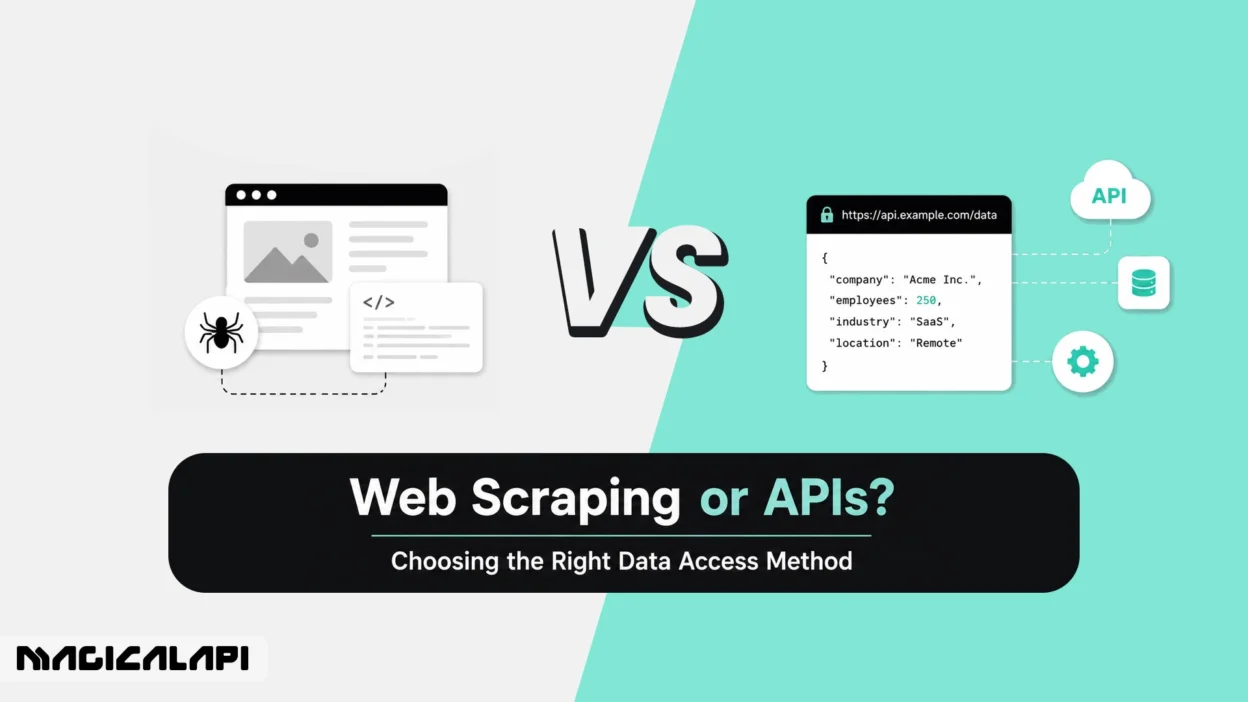
An API provides structured access to data through defined endpoints. Web scraping extracts data directly from web pages by reading and parsing the page content. APIs are usually cleaner and easier to maintain, while web scraping is more flexible when no official API exists or when an API does not provide enough data.
This guide compares both approaches and helps you choose the right data access method for your project.
Understanding Data Access: Web Scraping vs APIs
The main difference between API vs web scraping is how much structure the data provider gives you.
An API is an official way for software systems to communicate. The provider decides what data is available, how requests should be made, what format the response will have, and how many requests users can send.
Web scraping works differently. Instead of using a predefined endpoint, a scraper visits web pages, reads the underlying HTML or rendered page content, and extracts the information it needs.
If the data you need is available through a reliable API, that is usually the best starting point. But many websites do not provide public APIs, or their APIs only expose limited fields. In those cases, web scraping can help teams access publicly available web data that would otherwise be difficult to collect at scale.
In practice, many modern data pipelines use both. APIs are used for structured and stable data sources, while scraping or managed scraping APIs are used for public web data that is not available through official endpoints.
Web Scraping vs API: Quick Comparison
| Factor | Web Scraping | API |
| Source | Web pages and HTML | Official endpoints |
| Format | Raw or semi-structured data | Structured JSON or XML |
| Flexibility | High | Limited to available endpoints |
| Speed | Usually slower | Usually faster |
| Reliability | Can break after site changes | More stable if maintained |
| Maintenance | Higher | Lower |
| Cost | Infrastructure and developer time | Subscription or usage fees |
| Best for | Public web data without an API | Official, structured integrations |
What Is Web Scraping and How Does It Work?
Web scraping is the process of using automated tools or scripts to collect data directly from web pages.
When someone visits a website, the browser receives code from the server and turns it into a visual page. A web scraper reads that same page structure, identifies useful patterns, and extracts specific information such as names, prices, job titles, company details, product descriptions, links, reviews, or images.
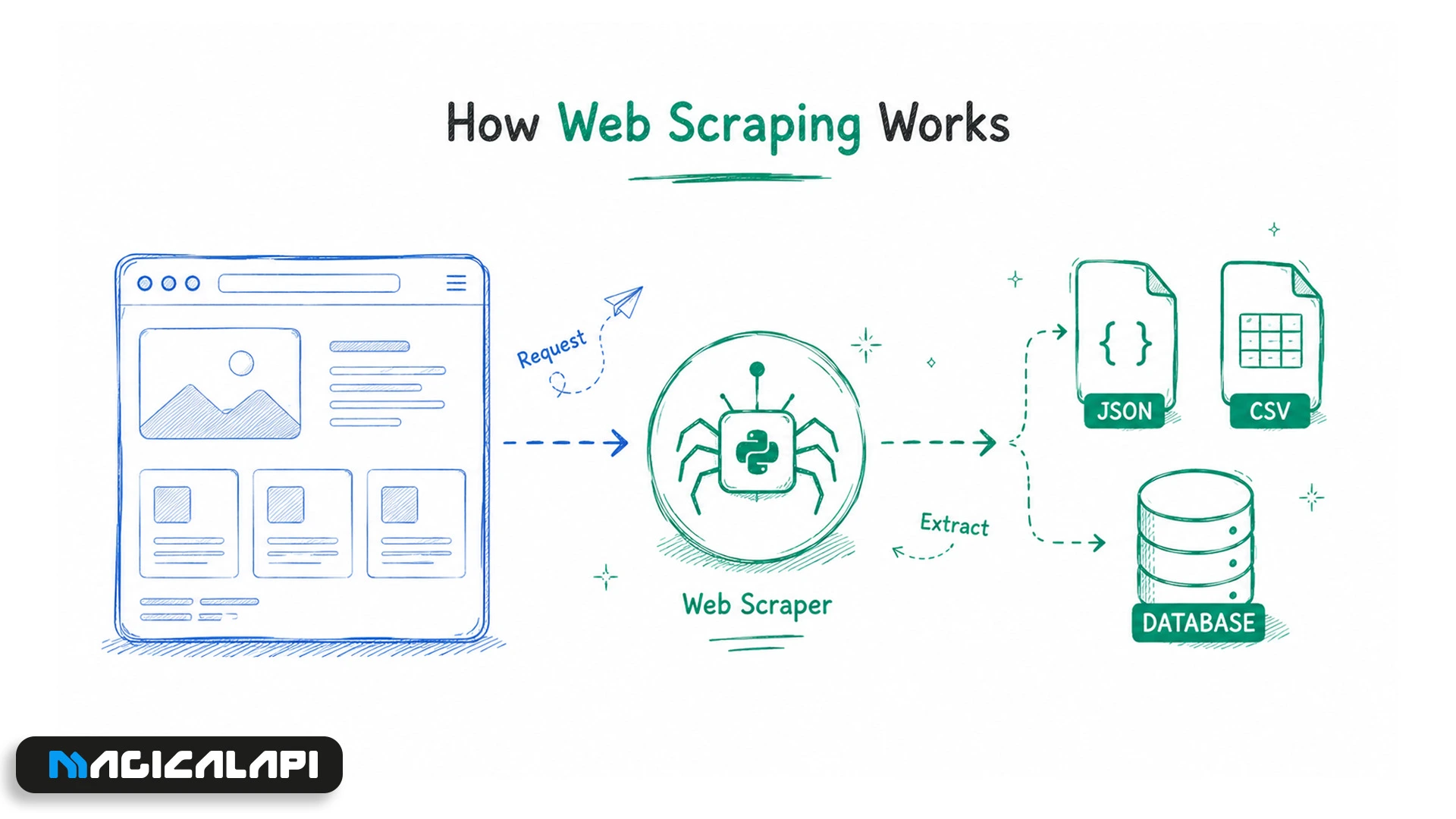
Simple scrapers may use CSS selectors or XPath to find data in HTML. More advanced scrapers may use headless browsers to interact with JavaScript-heavy websites, click buttons, fill out forms, scroll through pages, and collect data from dynamic sections.
The biggest advantage of web scraping is flexibility. If data is visible on a public web page, scraping can often help you collect it even when no official API exists.
For example, teams that need structured public profile data can use a LinkedIn Profile Scraper to collect information at scale without building custom parsing logic from scratch, a common starting point for recruiting, sales research, and talent intelligence workflows.
However, web scraping also requires careful handling. A responsible scraping workflow should avoid private data, respect access restrictions, prevent unnecessary server load, and follow applicable laws and terms.
LinkedIn Company Scraper - Company Data
Discover everything you need to know about LinkedIn Company Scraper , including its features, benefits, and the various options available to streamline data extraction for your business needs.
What Are APIs and Why Are They Popular?
An Application Programming Interface, or API, is a set of rules that allows software systems to exchange data.
Instead of reading a web page designed for human visitors, an API sends and receives data in a machine-readable format. Most modern APIs return structured responses in JSON or XML, which makes them easier to integrate into applications, dashboards, databases, CRMs, and automation tools.
This is why APIs are popular with developers. They reduce the need for custom parsing, cleaning, and browser automation. If the API is well documented and stable, developers can request a specific resource and receive predictable results.
The difference between web scraping and REST API is especially important. A REST API usually provides specific endpoints, such as profiles, companies, products, or jobs. Web scraping extracts data from the page itself.
For teams that need structured public professional data, a LinkedIn scraping API can offer an API-like workflow without requiring developers to build and maintain a custom scraper from scratch.
Key Differences Between Web Scraping and APIs
The biggest difference is control.
With an API, the data provider controls what is available. You can only access the fields, records, and actions the provider chooses to expose. This makes APIs stable and predictable, but sometimes limited.
With web scraping, the user has more flexibility. A scraper can collect information that appears on a public page, even if that information is not available through an API. This can be useful for market research, recruiting, e-commerce monitoring, lead generation, and competitive analysis. For professional data specifically, LinkedIn data scraping has become a common approach for teams that need public profile and company information that isn’t available through official endpoints.
APIs are usually faster because they return only the requested data. Web scraping may require loading full pages, rendering JavaScript, handling pop-ups, and filtering out irrelevant elements.
Web scraping can also be more fragile. A small change in a website’s layout, class names, or loading behavior can break a scraper. APIs can also change, but well-managed APIs usually provide documentation, versioning, and clearer update paths.
Pros and Cons of Web Scraping
Web scraping is useful when the data you need is publicly available but not accessible through a complete API.
Its biggest advantage is coverage. Scraping can collect data from product pages, directories, job listings, company pages, public profiles, search results, review sites, and other web sources.
It is also flexible. If the page contains the data, a scraper can often be designed to extract it.
But web scraping has clear drawbacks. It can require ongoing maintenance, especially when websites change frequently. At scale, it may also require proxies, browser automation, retry logic, monitoring, data cleaning, and storage infrastructure.
There are also legal and ethical considerations. Teams should be careful about what they collect, how they collect it, and whether their use case complies with relevant laws, privacy rules, and website terms.
Pros and Cons of APIs
APIs are usually the best option when they provide the data you need.
They offer structured output, better speed, easier integration, and lower maintenance. APIs are ideal for software products, dashboards, internal tools, analytics systems, and workflows that need reliable data exchange.
The downside is limitation. APIs only provide what the provider allows. Some APIs have strict rate limits, expensive pricing, limited fields, approval requirements, or restricted access.
In some cases, an API exists but does not support the depth or scale a business needs. That is when teams may consider web scraping or a managed scraping API as an alternative.
Data Accuracy, Reliability, and Update Frequency
Reliability is a major factor in the web scraping vs API decision.
APIs usually provide cleaner and more predictable data. If you are building a product that depends on stable schemas and consistent responses, an API is often the safer option.
Web scraping can provide access to data as it appears on live web pages. This is helpful when monitoring public-facing information, such as product prices, job listings, company descriptions, or public profile updates.
However, scraped data can include noise. A scraper may capture irrelevant text, miss dynamic content, or fail because of a layout change, cookie banner, or pop-up.
APIs can also have freshness limitations. Some API responses may be cached or delayed, meaning the data returned by the API may not always match what is currently visible on the website.
The right choice depends on what matters most: structured reliability or direct access to public web content.
Legal, Ethical, and Compliance Considerations
Legal and ethical considerations are important for both APIs and web scraping.
Using an API usually gives you a clearer framework because the provider defines usage rules, permissions, limits, and terms. But API access does not automatically mean every use case is allowed. You still need to follow the provider’s terms, licensing rules, and applicable privacy laws.
Web scraping is not automatically illegal, but it is highly context-dependent. Teams should review the website’s terms, robots.txt, access restrictions, data type, jurisdiction, and intended use. Publicly available data may still be protected by privacy, copyright, contract, or platform rules, especially when it includes personal data.
A responsible scraping strategy should avoid private, sensitive, or restricted data. It should also reduce server load, respect access controls, and follow applicable privacy regulations such as GDPR or CCPA where relevant.
For a deeper look at what is permitted and where the boundaries are, read our full breakdown of LinkedIn scraping policy before building your data pipeline.
Performance, Scalability, and Maintenance Effort
APIs are usually easier to scale because they are designed for machine-to-machine communication. Developers can send requests, receive structured responses, and process the results without rendering full web pages.
Web scraping can become more resource-intensive as projects grow. JavaScript-heavy websites may require headless browsers, which use more memory and CPU. Large scraping workflows may also need proxies, queues, retries, monitoring, and validation.
Maintenance is often the hidden cost of scraping. If your scraper depends on a specific page layout, even a small website update can break your extraction logic.
APIs have limits too. Providers may restrict request volume, remove data fields, change pricing, or limit access. When those limits become a problem, teams may need a hybrid approach.
Cost, Rate Limits, and Infrastructure Requirements
Web scraping may look cheaper at first because there is no API subscription. But the real cost depends on scale.
A small scraper can be inexpensive. A large scraping system may require cloud servers, proxies, browser infrastructure, monitoring, storage, data cleaning, and developer time.
APIs usually have more predictable pricing. Many use free tiers, monthly subscriptions, or pay-as-you-go models. This helps with planning, but costs can increase as request volume grows.
Rate limits are also different. APIs usually publish clear limits. Scraping limits are less predictable because they depend on website behavior, IP reputation, traffic patterns, and anti-bot systems.
The best option is not always the one with the lowest direct cost. It is the one with the best total cost of ownership, including reliability, maintenance, data quality, compliance, and engineering time.
A Smarter Way to Access Public Web Data
Many teams want the reliability of an API and the flexibility of web scraping. A managed scraping API can help bridge that gap.
Instead of building scrapers from scratch, teams can use structured data tools that return cleaner outputs through an API-like workflow. This reduces the need to manage selectors, browser automation, parsing logic, proxy rotation, and site changes.
MagicalAPI is built around this idea for public professional and company data. It helps teams access structured data from public LinkedIn profiles and company pages for use cases such as recruiting, sales intelligence, market research, and business development.
For company research, a LinkedIn Company Scraper can help teams enrich account lists, analyze markets, and understand business segments without manually collecting information page by page.
This type of workflow is especially useful when teams need public web data in a structured format but do not want to maintain the full scraping infrastructure themselves.
LinkedIn Profile Scraper - Profile Data
Discover everything you need to know about LinkedIn Profile Scraper , including its features, benefits, and the different options available to help you extract valuable professional data efficiently.
Use Cases Where Web Scraping Makes Sense
Web scraping makes sense when the data you need is available on public web pages but not offered through a useful API.
Common use cases include competitive intelligence, ecommerce price monitoring, market research, public directory collection, review analysis, job market research, and public company data enrichment.
For example, if a company wants to monitor competitor pricing, it is unlikely that competitors will provide an API for that data. Scraping may be the only practical option.
Recruiting and sales teams can also use public web data to improve research workflows. Structured data collection can support talent mapping, sourcing, outreach preparation, and market analysis.
Web scraping is not the right choice for every case. If the data is private, sensitive, protected behind a login, or restricted by terms you cannot comply with, an official API or permission-based data source is usually safer.
Use Cases Where APIs Are the Better Choice
APIs are better when the data provider offers complete, reliable, and affordable access to the data you need.
They are ideal for payment systems, financial data, maps, weather data, SaaS integrations, analytics tools, and internal software workflows.
APIs are also better when your system depends on stable schemas, fast response times, clear documentation, and predictable limits.
If the API provides everything your project needs, scraping would add unnecessary complexity.
How to Choose the Right Data Access Method for Your Project
To choose between web scraping and APIs, start with these questions:
- Does the source offer an API?
If yes, check whether it includes the data you need. - Is the API complete enough?
If the API is too limited, expensive, or restrictive, scraping may be worth considering. - How often does the data change?
For real-time or high-frequency data, APIs are usually better. For public information that changes less often, scraping can work well. - How much maintenance can your team handle?
If you do not want to manage scraping infrastructure, a managed scraping API may be more efficient. - What are the compliance requirements?
If the data involves sensitive, private, or regulated information, review the legal and ethical requirements carefully. - Do you need structured output?
If you need clean data for a CRM, database, analytics tool, or recruiting workflow, API-based access can save time.
For many teams, the best answer is not strictly scraping or API. It is a hybrid approach that uses APIs where they work well and managed scraping where public data is not available through official endpoints.
Web Scraping vs API: Final Decision Checklist
Use an API if:
- The provider offers the data you need
- You need structured JSON or XML
- Speed and stability are priorities
- You want lower maintenance
- Clear documentation and rate limits matter
Use web scraping if:
- No useful API exists
- The API is too limited
- The data is publicly visible
- You need broader coverage
- Your team can handle maintenance
- The use case is legally and ethically appropriate
Use a managed scraping API if:
- You want public web data in a structured format
- You do not want to build scraping infrastructure
- You need scale without constant maintenance
- You want an API-like workflow for data that is not available through official APIs
Conclusion
There is no single winner in the debate between web scraping vs API.
APIs are usually better for structured, reliable, and repeatable data access. Web scraping is better when the data you need is publicly available online but not provided through an API.
For many businesses, the best long-term approach is hybrid. Use APIs where they are available and complete. Use web scraping or managed scraping APIs when you need broader access to public web data.
As your project grows, your data needs will change. You may start with a simple scraper, move to an API, or use a managed service that combines the flexibility of scraping with the structure of an API.
The goal is always the same: turn scattered web data into clean, usable, and reliable intelligence.
Common Questions About Web Scraping vs APIs
What is the main difference between web scraping and an API?
An API provides structured data through official endpoints. Web scraping extracts data directly from web pages. APIs are usually more stable, while web scraping is more flexible when no API exists.
Is web scraping better than an API?
Not always. Web scraping is better when the data is publicly visible but not available through an API. If a reliable API provides the data you need, the API is usually the better choice.
What is the difference between web scraping and REST API?
A REST API provides data through predefined endpoints. Web scraping extracts data from HTML or rendered web pages. REST APIs are designed for software communication, while web pages are designed for human browsing.
Which is faster: API or web scraping?
APIs are usually faster because they return structured data directly. Web scraping often requires loading, rendering, parsing, and cleaning web page content.
Is web scraping legal?
It depends on the data, website terms, jurisdiction, and use case. Scraping public data may be allowed in some contexts, but teams should avoid private or sensitive data and follow applicable laws and terms.
When should I use a web scraping API?
Use a web scraping API when you need public web data in a structured format but do not want to build and maintain scraping infrastructure yourself.
Which is better for LinkedIn data: scraping or API?
It depends on your workflow. For structured public LinkedIn profile, company, or job data, a managed API-based solution can be more efficient than maintaining custom scraping scripts.