







Automated systems have been increasingly employed by businesses beyond repetitive processes. In 2026, companies will be looking at software capable of understanding data, suggesting decisions, categorizing information, and aiding people in decision-making. This has led to AI workflow automation solutions becoming necessary in the process of running a modern company. Still, not all tools address the same needs.
There are those designed as visual workflow creators for non-technical individuals. Other options are more developer-friendly orchestration systems or artificial intelligence products used in the wider scope of the automated workflow process.
How the Tools Were Selected
This comparison evaluates tools that remain relevant in 2026 across six decision factors: AI and agent capabilities, integration breadth, workflow flexibility, deployment model, scalability and governance, and pricing.
The list intentionally includes different layers of the automation stack rather than treating every product as a direct substitute. It covers no-code and low-code orchestration platforms such as Zapier, Make, and n8n; enterprise automation, iPaaS, and RPA platforms such as Power Automate, Workato, and UiPath; developer and agent frameworks such as LangChain, CrewAI, and Pipedream; and a specialized AI/data API layer in MagicalAPI.
That distinction matters because the best choice depends on whether you need to orchestrate apps, build agentic systems, automate UI-heavy processes, or supply structured AI data to a larger workflow.
Quick Comparison Table of AI workflow automation tools
These products are not all direct substitutes. The revised table compares the role each one plays in an AI-enabled workflow, its strongest use case, current AI capabilities, deployment model, and live pricing structure as verified on August 20, 2026.
| Tool | Type / Layer | Best For | Current AI Capabilities | Live Pricing / Plan Structure |
|---|---|---|---|---|
| viaSocket | AI-powered no-code workflow automation | Multi-app automation with built-in AI | AI-powered workflow builder, built-in AI capabilities, and 2,200+ app integrations | Free: 10,000 tasks + 500 AI credits/mo; pay-as-you-go top-ups as usage grows |
| Zapier | No-code automation / AI orchestration | Fast app-to-app automation | AI by Zapier with model tiers and tool-enabled agentic steps | Free: 100 tasks/mo; paid task-based plans; AI by Zapier available on Professional, Team, and Enterprise |
| Make | Visual automation / AI agents | Complex visual scenarios | Make AI Agents in Scenario Builder; modules, scenarios, and MCP tools | Free: 1,000 credits/mo; Core $12, Pro $21, Teams $38 at 10k credits/mo; Enterprise custom |
| n8n | Low-code workflow orchestration | Self-hosting + technical control | AI/LLM workflows; JS/Python code steps; AI Assistant on Cloud plans | Community Edition self-hosted; Cloud Starter €20/mo and Pro €50/mo billed annually; self-hosted Business €667/mo; Enterprise custom |
| Microsoft Power Automate | Enterprise DPA / RPA | Microsoft-centric enterprise automation | Cloud flows, attended/unattended RPA, AI Builder entitlements | 30-day trial; Premium $15/user/mo; Process $150/bot/mo; Hosted Process $215/bot/mo (US list prices) |
| LangChain | Open-source agent framework | Code-first AI applications | create_agent; LangGraph orchestration; durable execution and human-in-the-loop support | LangChain framework is open source; LangSmith Developer $0/seat, Plus $39/seat/mo + usage, Enterprise custom |
| CrewAI | Multi-agent framework / platform | Collaborative agent systems | Crews + stateful/event-driven Flows; hosted visual editor and AI copilot | Hosted Free: 50 workflow executions/mo; Enterprise custom; OSS deployments also incur model/infrastructure costs |
| MagicalAPI | Specialized AI/data API layer | Recruitment + business-data workflows | Resume Parser, Checker, Matcher; LinkedIn Profile/Company Scraper; webhooks and structured API outputs | Credit-based Free, Basic, Pro, and Business plans; Pro includes API access; Business is custom |
| Workato | Enterprise iPaaS + agent orchestration | Enterprise integration + governance | AI agents, workflow orchestration, API management, IDP, enterprise MCP | Free: 50K one-time credits; Pro: $100/mo with 3.5K credits/mo; Enterprise custom |
| Pipedream | Developer workflow platform | API- and code-heavy automation | Serverless workflows, custom Node.js/Python/Go/Bash, managed auth, MCP and 10K+ tools for AI apps | Free tier + paid credit-based plans; workflow credits scale with compute time and memory |
| UiPath | Enterprise agentic automation / RPA | RPA + document and communications automation | Agents, robots, API workflows, document extraction, HITL, and process orchestration | Basic starts at $25/mo; Standard and Enterprise are custom-priced |
What Is AI Workflow Automation?
Traditional workflow automation primarily relies on predefined rules, structured inputs, triggers, and deterministic actions. It can still process documents or data when dedicated parsers, OCR, or rule-based logic are available, but it does not inherently interpret unstructured content or adapt decisions based on context.
AI workflow automation adds machine learning and large language models to that workflow layer, allowing a process to classify text, extract information, summarize content, generate responses, or make context-dependent routing decisions before the next automated step.
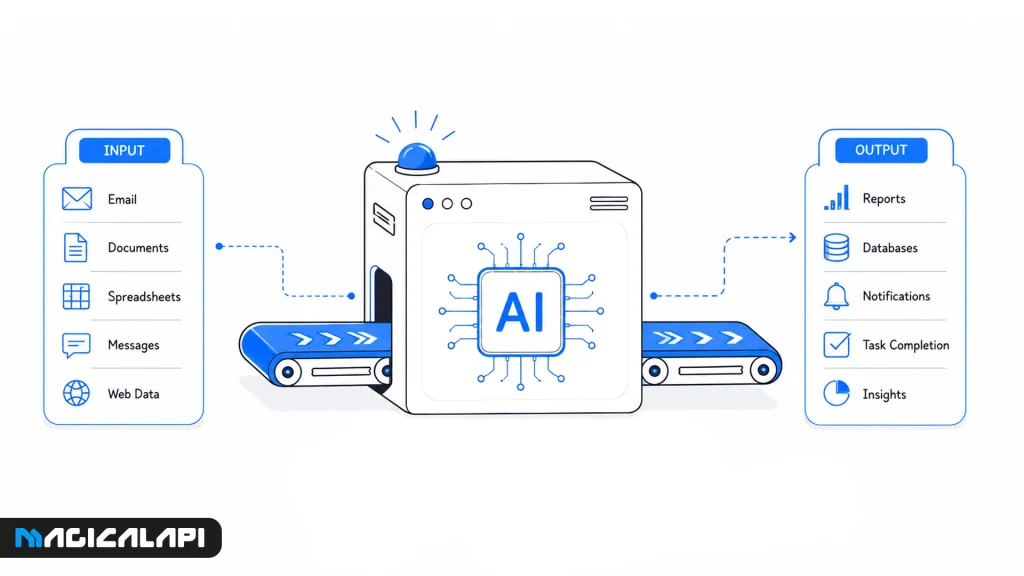
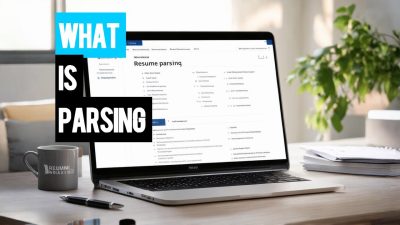
For example, instead of sending every application directly to an HR inbox, an AI-enabled hiring workflow can parse resumes, compare candidates with a job description, and route the resulting structured data to recruiters using AI resume tools.
1. viaSocket: AI-Powered No-Code Workflow Automation
viaSocket is an AI-powered workflow automation platform designed to connect business applications, APIs, and AI tools without requiring users to build integrations from scratch. It combines a visual workflow builder with built-in AI capabilities and access to more than 2,300 app integrations.
Best for: Teams that want to automate multi-app business processes while adding AI-powered actions and decision-making without extensive development work.
AI capabilities: viaSocket includes built-in AI agents that can analyze workflow data, make decisions, and trigger actions across connected applications. It also supports AI-powered workflow creation and integrations that can be used as tools within AI-driven processes.
Key strength: A broad integration ecosystem combined with AI-native workflow features makes viaSocket suitable for teams that want both traditional app automation and more adaptive AI workflows.
Main limitation: Teams with highly customized infrastructure or strict self-hosting requirements may prefer developer-oriented or self-hosted platforms such as n8n or Pipedream.
Pricing: viaSocket offers a Free plan with 10,000 tasks and 500 AI credits per month. Paid plans increase task and AI credit allowances, with Premium currently priced at $99 per month.
2. Zapier: Fast No-Code Business Automation
Zapier is among the most used AI automation software for businesses wishing to automate tasks without requiring coding skills. It integrates thousands of business applications, and therefore workflow automation is fast and easy.
Best for: Non-technical teams that want to connect business apps quickly and build straightforward automations with minimal setup.
AI capabilities: AI by Zapier supports model tiers and tool-enabled agentic steps on paid plans. Sales teams can combine these capabilities with B2B sales prospecting tools to qualify, route, and enrich leads before CRM handoff.
Key strength: Ease of use and a broad integration ecosystem make Zapier one of the fastest platforms for launching common business workflows.
Main limitation: Task-based usage can become expensive as workflows scale, and the Free plan is limited to 100 tasks per month and two-step Zap workflows.
Pricing: The Free plan includes 100 tasks per month. Paid plans use task-based pricing; AI by Zapier is currently available on Professional, Team, and Enterprise plans, with model tiers consuming different task multipliers.
3. Make: Complex Visual Workflows
Make is one of the AI Workflow Automation Tools that uses visualizations to help companies. The scenario builder provides support for branching, filters, routers, and multi-step workflows.
Best for: Teams that need visual control over multi-step workflows, branching, filters, routers, and more complex data flows.
AI capabilities: Make AI Agents are built directly into the Scenario Builder. Agents can use modules, scenarios, and MCP tools, and Make exposes reasoning and tool use in the visual canvas.
Key strength: Its visual-first approach makes complex orchestration easier to inspect. Marketing teams can combine campaign inputs with marketing data enrichment, AI analysis, and scheduled reporting in one scenario.
Main limitation: Large scenarios can become difficult to maintain, and usage is credit-based. The current Make AI Agent (New) experience is still in open beta, so product functionality and pricing may evolve.
Pricing: The Free plan includes up to 1,000 credits per month. At 10,000 credits per month, Core is $12/month, Pro is $21/month, and Teams is $38/month; Enterprise uses custom pricing.
4. n8n: Self-hosted AI Workflow Automation
n8n is one of the most powerful options for those companies that need flexibility but do not want to sacrifice their visual workflow design.
Best for: Technical teams that want a visual workflow builder without giving up code or deployment control.
AI capabilities: n8n supports AI-enabled workflows through its node ecosystem, while Cloud plans now include AI Assistant credits in preview. Workflows can also use JavaScript or Python code steps and custom HTTP or GraphQL requests.
Key strength: Deployment flexibility and developer control. The Community Edition can be self-hosted, while paid Business and Enterprise options add broader collaboration, governance, and scale features.
Main limitation: Self-hosting and sophisticated workflows require more technical ownership than beginner-first no-code platforms.
Pricing: Community Edition is available as a standard self-hosted version. Cloud Starter is €20/month billed annually for 2,500 executions; Pro is €50/month billed annually for 10,000 executions. The self-hosted Business plan is €667/month billed annually for 40,000 executions, while Enterprise pricing is custom.
5. Microsoft Power Automate: Microsoft-based Enterprise Automation
Microsoft Power Automate supports business workflows within Microsoft 365, Dynamics 365, Azure, and other Microsoft products. It is a mix of RPA, cloud workflow, and AI Builder for processing documents and approvals.
Best for: Organizations centered on Microsoft 365, Dynamics 365, Azure, and HR process automation that also need cloud flows or desktop RPA.
AI capabilities: Power Automate combines cloud flows with attended and unattended desktop RPA. Current Premium, Process, and Hosted Process licenses also include AI Builder credit entitlements that can support AI-assisted document and process scenarios.
Key strength: Tight integration with the Microsoft ecosystem plus enterprise-grade automation, connectors, process mining, and RPA options.
Main limitation: For non-Microsoft companies, the product might lack flexibility, and the AI capabilities may add to the cost of licensing.
Pricing: Microsoft currently lists a 30-day free trial, Power Automate Premium at $15/user/month, Process at $150/bot/month, and Hosted Process at $215/bot/month when paid yearly. These are US list prices and can vary by region.
6. LangChain: Building Custom AI Applications
LangChain is designed for developing apps using large language models. This framework integrates AI models with external data, APIs, memory, and decision-making.
Best for: Developers building code-first AI applications and agents rather than general SaaS-to-SaaS business automation.
AI capabilities: LangChain now centers its agent API around create_agent, while LangGraph provides lower-level orchestration for advanced deterministic and agentic workflows. LangGraph adds durable execution, persistence, and human-in-the-loop support.
Key strength: A configurable framework that can connect models, tools, middleware, and application logic across multiple model providers.
Main limitation: It is a developer framework, not a beginner-oriented visual workflow automation product, so production use requires software engineering skills.
Pricing: The LangChain framework is open source. LangSmith is a separate managed product: Developer is $0/seat/month with usage limits, Plus is $39/seat/month plus usage, and Enterprise uses custom pricing.
7. CrewAI: Multi-agent AI Workflows
CrewAI allows enterprises to create workflows utilizing several AI agents collaborating rather than a single agent or model. Agents specialized in certain skills, like researching, validating information, generating information, or analyzing data, are able to collaborate during one workflow process. Therefore, CrewAI is great for complex workflows that require multiple reasoning processes.
Best for: Developers building workflows in which multiple specialized AI agents collaborate on distinct tasks.
AI capabilities: CrewAI combines Crews for collaborative autonomous agents with Flows for stateful, event-driven workflow control. Its hosted Free plan also includes a visual editor and AI copilot.
Key strength: A multi-agent architecture that separates workflow control from the teams of agents performing specialized work.
Main limitation: Production multi-agent systems still require careful technical design, monitoring, model selection, and cost control; open-source deployments also carry infrastructure and model costs.
Pricing: CrewAI remains open source, while its hosted Basic plan is currently Free with 50 workflow executions per month. Enterprise pricing is custom.
8. MagicalAPI: AI-powered Recruitment & Business Data Workflows
MagicalAPI is an AI/data solution that is designed to fit into more complex automated business processes. Instead of being used as a visual workflow designer, MagicalAPI delivers structured AI results through its APIs, which may be used within automation platforms like viaSocket and others.
Best for: Recruitment, resume intelligence, LinkedIn data, and business-data tasks that need to run as a specialized step inside a larger workflow.
AI capabilities: MagicalAPI is not a general-purpose workflow builder. It acts as a specialized AI and structured-data layer with Resume Parser, Resume Checker, Resume Matcher, LinkedIn Profile Scraper, LinkedIn Company Scraper, structured API outputs, and webhooks for LinkedIn data scraping and related automation workflows.
Key strength: Workflow-ready structured outputs for recruiting and business-data use cases, delivered through APIs instead of a visual orchestration canvas.
Main limitation: It does not replace orchestration platforms such as Make, Zapier, n8n, or viaSocket; it is designed to supply specialized data or AI processing within those workflows.
Pricing: MagicalAPI uses a credit-based model across Free, Basic, Pro, and Business plans. The current Pro plan includes 300,000 credits and API access, while Business is a custom plan for higher-volume needs.
9. Workato: Enterprise Automation & Integration
Workato targets large enterprises that require AI-based automation in many business applications. Workato integrates enterprise integration, workflow automation, and artificial intelligence in one solution.
Best for: Organizations that need enterprise integration, orchestration, governance, and AI agents across a large application environment.
AI capabilities: Workato currently positions the platform around AI agents and orchestration, with enterprise MCP, workflow orchestration, API management, real-time data and event orchestration, and Intelligent Document Processing on Pro and above.
Key strength: Enterprise-scale integration and governance. Workato currently advertises 10,000+ app and system integrations on its Free/Pro offering and broader enterprise controls on its custom tier.
Main limitation: The platform is broader and more enterprise-oriented than lightweight automation tools, and the most advanced governance and scale features remain on custom Enterprise pricing.
Pricing: Workato now has public entry plans: Free is $0 with 50,000 one-time credits; Pro is $100/month with 3,500 credits per month; Enterprise uses custom pricing.
10. Pipedream: API-first Developer Workflows
Pipedream provides developers with the ability to create workflows via APIs, AI services, custom code, and data transformation pipelines.
Best for: Developers who want serverless workflows with direct access to APIs, custom code, managed authentication, and AI-agent integrations.
AI capabilities: Pipedream workflows can combine pre-built actions with custom Node.js, Python, Go, or Bash code for APIs and data transformation. Pipedream Connect also exposes managed auth and an MCP server with 10,000+ pre-built tools for AI applications.
Key strength: Code-level flexibility without managing servers or workflow infrastructure, plus built-in authentication and thousands of app integrations.
Main limitation: The platform is developer-oriented; teams without technical skills may find code steps, API concepts, and credit-based compute usage harder to manage.
Pricing: Pipedream offers a Free tier and paid credit-based plans. Workflow credits are based on compute usage: at the default 256 MB memory, one credit is charged per 30 seconds of workflow execution, with higher memory consuming proportionally more credits.
11. UiPath: Intelligent Robotic Process Automation
UiPath is one of the prominent AI Workflow Automation Tools that provides a platform for enterprise RPA and document automation combined with AI capabilities for document comprehension and decision-making.
Best for: Enterprises that need RPA, UI automation, document and communications processing, and human review within larger automation programs.
AI capabilities: UiPath now positions its Automation Cloud around agentic automation. Standard and Enterprise tiers can combine Agents, Robots, API workflows, document classification and extraction, human-in-the-loop steps, and orchestration of agents, robots, and people.
Key strength: Enterprise scalability, governance, document automation, UI automation, and the ability to combine deterministic robots with agentic tasks.
Main limitation: Implementation and governance are more complex than lightweight no-code tools, and Standard/Enterprise pricing requires a sales conversation.
Pricing: UiPath Basic currently starts at $25/month. Standard and Enterprise use contact-sales pricing; both add broader enterprise automation and agentic capabilities beyond Basic.
AI Workflow Automation Examples
AI workflow automation is most useful when a process combines deterministic steps with tasks that require interpretation, classification, extraction, or adaptive routing. Common examples include:
- Recruitment screening: Parse incoming resumes, extract structured candidate data, compare applicants with a job description, and route the results to a recruiter or ATS for review.
- B2B lead enrichment: Collect a lead or company record, enrich it with structured public business data, score or categorize the record, and send qualified opportunities to the CRM.
- Marketing reporting: Collect performance data from multiple sources, normalize the inputs, generate an AI summary of changes or anomalies, and deliver a scheduled report to stakeholders.
- Document and invoice processing: Extract fields from invoices or forms, validate the data against business rules, request human approval for exceptions, and then update the ERP or finance system.
- Customer support triage: Classify inbound tickets by topic and urgency, summarize context, draft a response, and route complex or high-risk cases to the appropriate human team.
How to Choose the Right AI Workflow Automation Tools
- Business fit and technical level: Choosing the right AI workflow automation tool starts with the workflow itself: who will build it, how much technical control is required, how critical the process is, and how the workload is expected to scale.
- Builder experience: Non-technical teams usually benefit from visual tools such as Zapier or Make, while n8n gives technical teams a visual interface with deeper code and self-hosting options.
- Integration coverage and AI depth: Developer-centered options such as LangChain, CrewAI, and Pipedream provide more control over code, APIs, agents, and custom logic. At the same time, integration coverage matters: review the CRM, ERP, storage, communication, database, and API connections your workflow actually needs. Also distinguish simple AI steps such as summarization and classification from workflows that require agentic decision-making, tool use, or complex data transformation between systems.
- Deployment, governance, and cost: Deployment requirements can narrow the shortlist quickly. Teams with strict security, data-residency, or governance requirements may prioritize self-hosted or enterprise deployment options, while cloud-first teams may prefer simpler managed platforms. For high-impact decisions, verify human-in-the-loop controls and auditability. Finally, model the pricing unit—tasks, credits, executions, users, bots, or API requests—against expected workflow volume rather than comparing only entry-level plan prices.
Final Recommendations
There is no single perfect AI workflow automation tool; the right choice depends on the layer you need to automate. Select Zapier for basic business automation, Make for more complex no-code workflows, Power Automate for Microsoft environments, and n8n when self-hosting and technical control matter.
For AI application development, LangChain remains a strong option for LLM orchestration, while CrewAI is designed around multi-agent collaboration. If your workflow needs resume processing, candidate-job matching, LinkedIn data, or structured business-data extraction, MagicalAPI can act as a specialized data layer alongside a broader orchestration platform. For the technical background, see AI data scraping explained.
Frequently Asked Questions
What is AI workflow automation?
AI workflow automation combines conventional workflow logic with AI capabilities such as classification, extraction, summarization, generation, and context-aware decision support.
Which AI workflow automation platform is best for beginners?
Zapier is usually the easiest starting point for simple app-to-app automation. Make is another beginner-accessible option for users who want a more visual canvas and greater control over branching and multi-step scenarios.
Can small businesses use AI automation software?
Yes. Small businesses can use cloud-based automation platforms to streamline customer support, marketing, sales, invoicing, scheduling, and document processing without building their own automation infrastructure.
Is one automation platform sufficient for every workflow?
Not always. Many teams combine an orchestration platform with specialized services. For example, n8n or Make can coordinate the workflow while MagicalAPI handles resume parsing, candidate matching, or structured business-data extraction.